



If you have ever scrolled through your social media feed and stopped to watch a looping animation or a clever motion graphic, you already understand the power of movement. Animation on social media has become one of the most effective ways to capture attention in a crowded digital space. Whether it is a simple GIF, a flashy product reveal, or subtle text effects, animated content stands out in a way that static images often cannot match.
The good news is that you do not need to be a professional animator to add motion to your social posts. With the right tools and a bit of practice, anyone can create eye-catching animated content that helps boost engagement and build a stronger connection with their audience.
This guide will walk you through everything you need to know about using animation on social media. You will learn why movement grabs attention, explore different types of animated content, discover beginner-friendly tools, and pick up practical tips for making your animations work across different platforms. By the end, you will have a clear roadmap for adding motion design to your social media strategy.
Why Animation Grabs Attention on Social Media

Human eyes are naturally drawn to movement. This is not just a preference—it is how our brains are wired. When something moves in our peripheral vision, we instinctively turn to look at it. This biological response helped our ancestors spot predators and prey, and today it helps animated content stand out in busy social feeds.
Think about what happens when you scroll through Instagram or LinkedIn. Most of the content you pass is static—photos, text posts, infographics. But when something moves, your brain flags it as different and potentially important. You pause. You look. And that pause is incredibly valuable for anyone trying to communicate a message or build a brand.
Animation also helps communicate complex ideas quickly. A short motion graphic can show how a product works, demonstrate a process, or explain a concept in just a few seconds. This is especially useful given how quickly people move through their feeds. You often have less than two seconds to make an impression, and animation gives you a better chance of making that time count.
Beyond grabbing attention, animation creates emotional connections. Smooth, well-timed motion feels satisfying to watch. Playful animations can make a brand feel more approachable. Dynamic movement can convey energy and excitement. These subtle emotional cues help shape how people feel about your content and your brand.
With social media’s growing influence on how we communicate and consume information, visual content has become essential. Animation takes visual content a step further by adding the element of time and motion, creating experiences that feel more alive and engaging than anything static can offer.
Types of Animation That Work Best on Social Platforms
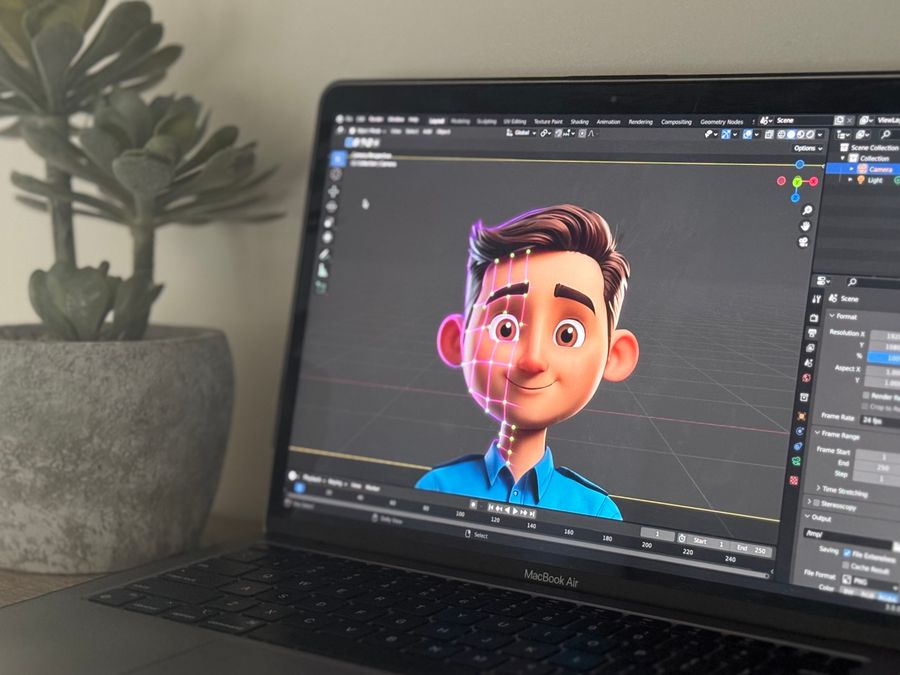
Not all animations are created equal, and different formats work better for different purposes. Understanding the main types of animation on social media will help you choose the right approach for your content goals.
GIFs and Short Loops
GIFs are one of the oldest and most widely used animation formats online. These short, looping clips are perfect for reactions, humor, and quick visual moments. They load quickly, play automatically on most platforms, and are easy to share. Platforms like GIPHY offer vast libraries of existing GIFs and tools for creating your own, making this format accessible to anyone.
GIFs work especially well for adding personality to social posts. A well-chosen reaction GIF can humanize a brand and make content feel more relatable. They are also useful for showing product features, demonstrating before-and-after transformations, or creating simple tutorials.
Motion Graphics
Motion graphics combine graphic design elements with animation to create dynamic visual content. This includes animated logos, infographics that reveal data points over time, and promotional videos with moving text and shapes. Motion graphics tend to look polished and professional, making them popular with brands and businesses.
This format is excellent for explaining concepts, highlighting statistics, or walking viewers through a process. Because motion graphics use designed elements rather than filmed footage, they give you complete creative control over the visual style.
Kinetic Typography
Kinetic typography brings text to life through animation. Words can bounce, slide, fade, grow, or transform in ways that reinforce their meaning and capture attention. This technique is popular in social video content because it helps convey messages even when videos are watched without sound—which happens more often than you might expect.
If you want to explore how text design can elevate your content, learning about creative typography for social media can give you a strong foundation to build on.
Cinemagraphs
Cinemagraphs are still photos with subtle, repeated motion in one area. Imagine a coffee cup sitting on a table with steam gently rising, or a portrait where only the subject’s hair moves slightly in the wind. These animations feel magical because they blend the familiar stillness of photography with unexpected movement.
Cinemagraphs work well for creating mood and atmosphere. They draw the eye without feeling overwhelming and can make lifestyle or product imagery feel more immersive and premium.
Tools for Creating Animated Social Media Content

You do not need expensive software or years of training to create animation on social media. Today, there are tools for every skill level, from complete beginners to seasoned professionals. Here is an overview of popular options worth exploring.
Professional Animation Software
For those who want maximum creative control and do not mind a steeper learning curve, professional tools offer powerful capabilities. Adobe After Effects is the industry standard for motion graphics and visual effects. It allows you to create complex animations, composite multiple layers, and achieve nearly any visual effect you can imagine.
After Effects integrates with other Adobe products and has an enormous library of tutorials and plugins. While it takes time to master, the investment pays off for anyone who wants to create high-quality motion content regularly.
Beginner-Friendly Design Platforms
If professional software feels intimidating, beginner-friendly platforms make animation accessible to everyone. Canva has built-in animation features that let you add motion to text, graphics, and entire designs with just a few clicks. You can choose from preset animation styles or customize timing and effects.
These platforms are perfect for social media managers, small business owners, and content creators who want to produce animated posts without dedicating weeks to learning complex software. Modern AI-powered design tools have made the process even simpler by automating many technical aspects of animation creation.
Lightweight Animation Resources
Sometimes you need animations that are easy to use across different contexts without slowing down websites or apps. LottieFiles provides a library of lightweight, web-friendly animations that designers and developers love. These vector-based animations scale perfectly to any size and load quickly on any device.
Lottie animations are especially popular for micro-interactions—small animated elements like loading indicators, buttons, and icons that make digital experiences feel more polished and responsive.
Mobile Animation Apps
For quick animations created right on your phone, several mobile apps offer impressive capabilities. These apps let you add animated text, stickers, and effects to photos and videos without needing a computer. They are perfect for creating Stories content, quick promotional clips, or adding animated elements to existing footage.
Many social platforms also have built-in animation tools. Instagram Stories, for example, offers animated text options, stickers, and effects that you can apply while creating content directly in the app.
How to Use Animation on Different Social Platforms
Each social platform has its own culture, technical requirements, and audience expectations. What works brilliantly on TikTok might fall flat on LinkedIn. Understanding these differences will help you create animation on social media that resonates with each specific audience.
Instagram supports animation in several formats. Feed posts can include video, and Stories has become a hub for creative animated content. Reels favor short, punchy videos with strong hooks in the first few seconds.
For Instagram, focus on high visual quality and bold, attention-grabbing motion. The platform rewards content that makes people stop scrolling. Animated product reveals, behind-the-scenes glimpses with subtle motion effects, and kinetic typography work particularly well here.
TikTok
TikTok thrives on authenticity, creativity, and trend participation. While polished motion graphics have their place, many successful animations on TikTok feel more spontaneous and playful. The platform’s editing tools make it easy to add transitions, effects, and animated text directly in the app.
Speed is important on TikTok. Content moves fast, and viewers decide quickly whether to keep watching or swipe away. Your animations should complement this pace—quick transitions, snappy reveals, and dynamic movement tend to perform well.
LinkedIn audiences tend to prefer more professional, informative content. Animation on this platform often focuses on explainer videos, animated infographics, and motion graphics that present data or insights clearly.
Keep animations on LinkedIn clean and purposeful. Avoid anything that feels too flashy or gimmicky. The goal is to communicate value and expertise, and your motion design should reinforce that professional image.
Facebook and Other Platforms
Facebook supports a wide range of animated content, from GIFs and short videos to longer form content. The platform’s algorithm tends to favor video content, so adding animation to your strategy can help improve reach.
When developing social media engagement strategies, remember that each platform requires a slightly different approach. What matters most is understanding your specific audience on each platform and creating animations that speak to their interests and expectations.
Animation in Social Media Ads and Marketing
Animation has become a powerful tool for brands running paid campaigns on social platforms. Animated ads tend to stand out more than static images in crowded feeds, helping advertisers capture attention and communicate messages more effectively.
Why Animated Ads Perform Well
Movement naturally draws the eye, which means animated ads are more likely to stop a scroll than static alternatives. This increased attention translates to better brand awareness and often improved engagement metrics.
Animated ads also let you tell a story in a short time. You can introduce a problem, present a solution, and end with a call to action—all within a few seconds. This storytelling capability makes animation particularly effective for demonstrating products, explaining services, or guiding viewers through a value proposition.
When comparing different approaches to social media advertising, animation often emerges as one of the most versatile options. It works across platforms, appeals to various audiences, and offers creative flexibility that static images cannot match.
Creating Effective Animated Ads
The most successful animated ads share several characteristics. They grab attention immediately with strong opening motion. They communicate their core message quickly. They maintain visual clarity without becoming cluttered or confusing. And they end with a clear call to action that tells viewers what to do next.
Sound is another consideration. Many social users watch videos without sound, so your animation should communicate effectively even when muted. Use text overlays, expressive visuals, and clear imagery to ensure your message comes through regardless of audio settings.
Animation Beyond Social Feeds
While social media is a primary channel for animated marketing content, the same principles apply elsewhere. Animated elements enhance email campaigns, website experiences, and digital advertising across the web. Tools like the email templates builder from Stripo help marketers create animated email campaigns that stand out in crowded inboxes.
Building animation skills for social media gives you capabilities that transfer to many other marketing contexts. The visual storytelling principles remain consistent whether you are creating an Instagram Reel or an animated banner ad.
Measuring the Impact of Animated Content
Creating great animation is only part of the equation. To improve over time and justify your investment in motion content, you need to understand how your animated posts actually perform.
Key Metrics to Track
For animated content, several metrics matter most. Views and impressions tell you how many people saw your animation. Engagement rate—including likes, comments, shares, and saves—shows how people responded. Watch time and completion rate reveal whether viewers stayed to see your full message or dropped off early.
Different platforms provide different analytics. Most offer native insights tools that show performance data for your posts. Using social media analytics effectively means regularly reviewing these numbers and looking for patterns that can inform your strategy.
Comparing Animated vs. Static Content
One valuable exercise is comparing performance between your animated and static posts. Do animations consistently generate more engagement? Which types of animation perform best with your audience? Are there certain topics or formats where static content actually works better?
These comparisons help you make informed decisions about where to invest your creative energy. You might find that certain animation styles resonate strongly with your audience while others fall flat.
Using Technology to Optimize
Modern technology can help streamline the analysis process. AI tools that boost social media engagement can analyze large amounts of performance data, identify trends, and even suggest optimizations for your animated content. These tools make it easier to understand what is working and why.
The key is establishing a regular review process. Set aside time each week or month to look at your animation performance, note what worked well, and identify opportunities for improvement. Over time, these insights will sharpen your instincts and improve your results.
Best Practices for Animation on Social Media
Following some basic best practices will help ensure your animated content looks professional and performs well across platforms.
Keep File Sizes Manageable
Large files load slowly and may not play smoothly on all devices. Optimize your animations to balance quality with file size. Most platforms have recommended specifications for video and animation uploads—following these guidelines helps ensure your content displays correctly.
Design for Mobile First
Most social media consumption happens on mobile devices. Design your animations with small screens in mind. Text should be large enough to read on a phone. Important elements should not be cut off by interface elements. Vertical or square formats often work better than wide horizontal layouts.
Respect Accessibility
Not everyone experiences animation the same way. Some people are sensitive to rapid flashing or strobing effects, which can cause discomfort or even trigger seizures. Avoid excessive blinking, flashing lights, or jarring movement in your animations.
Include captions or text alternatives for any spoken content. Make sure your message is clear even without audio. When animation conveys important information, provide text descriptions for those who may not be able to see the visuals.
Match Animation to Brand
Your animations should feel like a natural extension of your brand identity. If your brand is playful and fun, bouncy and energetic animations make sense. If you are a more serious or professional brand, smooth and subtle motion may work better.
Consistency matters. Developing a recognizable animation style helps build brand recognition over time. When optimizing social media for brand visibility, maintaining a consistent visual language—including animation style—reinforces your identity with every post.
Test and Iterate
Do not assume you know what will work best. Test different animation styles, lengths, and formats. Pay attention to what performs well and what does not. Social media is an ongoing experiment, and the most successful creators are those who learn from their results and continuously refine their approach.
Getting Started with Motion Design for Social Media
If you are new to animation on social media, the best advice is to start simple. You do not need to create complex motion graphics right away. Begin with small additions of movement—animated text on a photo, a simple GIF, or basic transitions in a video.
Pick one beginner-friendly tool and spend time getting comfortable with its features. Create a few test animations and share them to see how your audience responds. Pay attention to what feels natural and what gets engagement.
As you build confidence, experiment with more advanced techniques. Watch what other creators and brands are doing with animation and draw inspiration from content that catches your eye. With practice, you will develop your own style and learn what works best for your unique audience and goals.
Animation on social media is a skill that improves with time and experience. The most important step is simply getting started.